






Windows 11 Home
System Requirements
Make sure you are ready for the newest and greatest operating system from Microsoft! The Home edition is a perfect match for casual use, gaming and creative work.
These are the minimum requirements for installing Windows 11 Home on a PC. If your device does not meet these requirements, you may not be able to install Windows 11. If you are unsure whether your PC meets these requirements, you can use the PC Health Check app to assess compatibility.
- Processor: 1 gigahertz (GHz) or faster with 2 or more cores on a compatible 64-bit processor or System on a Chip.
- RAM: 4 GB.
- Storage: 64 GB or larger storage device.
- System firmware: UEFI, Secure Boot capable.
- TPM: Trusted Platform Module version 2.0.
- Graphics card: Compatible with DirectX 12 or later with WDDM 2.0 driver.
- Display: High definition 720p display that is greater than 9” diagonally, 8 bits per color channel.
- Internet connection and Microsoft accounts: Windows 11 Home requires internet connectivity and a Microsoft account to complete device setup on first use.
There may be additional requirements over time for updates, as well as requirements to turn on specific features within the operating system.
Windows 11 Home’s Benefits
- 5G support: Requires a 5G capable modem.
- Auto HDR: Requires an HDR monitor.
- DirectStorage: Requires an NVMe SSD and a DirectX 12 GPU with Shader Model 6.0 support.
- Touch: Requires a screen or monitor that supports multi-touch.
- Voice Typing: Requires a PC with a microphone.
- Wi-Fi 6E: Requires compatible hardware, driver and router.
- Windows Hello: Requires a compatible infrared camera, fingerprint reader, PIN or Microsoft compatible security key.
Microsoft Office 2019 Professional Plus
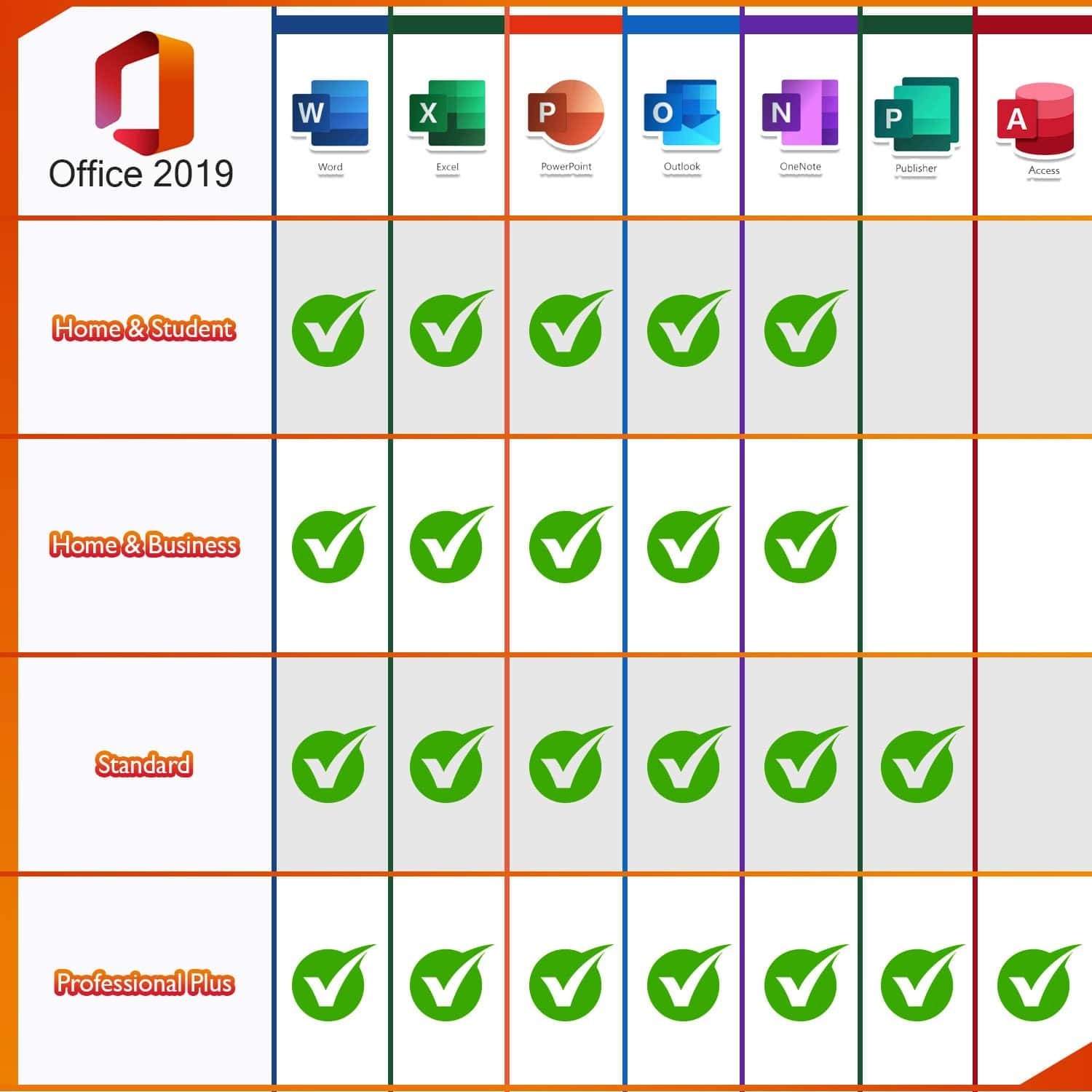
The newest version of the Microsoft Office suite features numerous improvements in terms of convenience, functionality and security. Microsoft Office 2019 Professional Plus is adapted to the new data protection regulations and is only compatible with Windows 10.
Microsoft Office 2019 Professional Plus is suitable for professional users who need a full range of functions without restrictions. It includes Word, Excel, PowerPoint, Outlook, Publisher, Access and Lync. OneNote is now included directly in the Windows 10 operating system.




Erdal Ertakus – :
This is the first time I have purchased a license not directly from Microsoft, but this program works very well and is even available at a very reasonable price, making it affordable for any budget.
Peter Mühlbach – :
It works perfectly and takes 1 minute. Don’t think, just buy!
Dennis egmannn – :
The software is satisfying if you don’t have high expectations. With this price, I would say that it is a good deal to have a program as such for convenience.
giovanni gagliano – :
I am amazed at the value of this product because I have been in the market for one but it’s too expensive so I’m so happy that Softwarelicenses has it available at this price for my kid. I just can’t get over how affordable it is.
Marco Reddemann – :
I asked one of their support team members (Michelle) for an invoice and got it within 5 minutes. Fast service!
Szibilla Lovász – :
Everything as described… excellent service!
Mathias Frieser – :
Delivered immediately and worked like a charm.
Martin Hörmann – :
Had difficulty downloading software. Called Softwarelicenses support, and received assistance, without much wait time, and the problems were resolved completely, almost immediately.
Ilyas Bartu – :
Excellent product for the price
Curt Lindemann – :
“Works great, very reliable!
I bought about 5 Office Keys
After about 1-2 months later they all still work!
I once had an issue emailed the vendor.. resolved within 5-10 minutes!”
Detlef Hochhaus – :
Great customer service … Fast and Accurate. Excellent.
Benedetto Huber – :
Everything worked fine. Functioning wonderful fast delivery, good quality all good 👍 Thank you
Andrea Azoff – :
The delivery was on time as stated.
Anthony Lear – :
Fast response and delivery. (even after working hours)